Resolving a hypothesis
When the review date arrives — or you've decided early that you have enough signal — you resolve the hypothesis. Resolution is where calibration actually gets recorded. It's the most important screen in the system.
You can reach it from the dashboard's Awaiting Resolution panel (Review button) or from any active hypothesis's detail page.
1. Re-read the kill criteria
The amber bar at the top reminds you of the trip-wire you set in the pre-mortem. If the metric crossed it, that's already a signal — don't ignore it just because the headline looks fine.

2. Fill the actual value for each claim
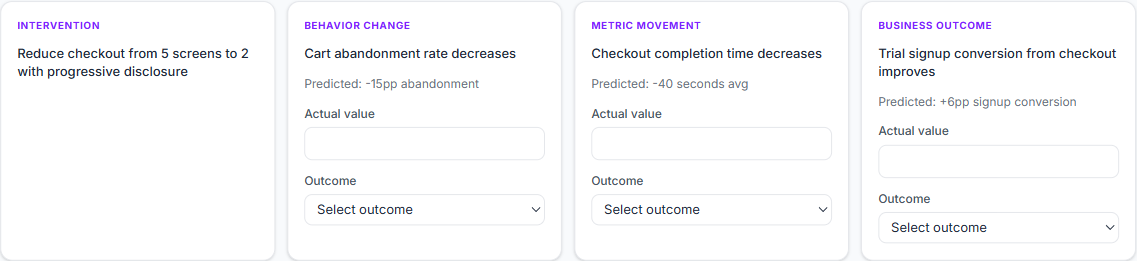
Each claim from your causal chain becomes a card. The first column — Intervention — has no actual value or outcome to mark. It only carries a description (the thing you shipped); you can't be "wrong" about what you decided to do.
For every claim after the intervention (Behavior Change, Metric Movement, Business Outcome…), the Predicted value is shown in grey for reference. Type what actually happened into the Actual value field — keep the units consistent with the prediction so the score is meaningful.
3. Mark the outcome for each claim
For each non-intervention claim, pick one of four outcomes:
| Mark | Means | How it scores |
|---|---|---|
| Held | Direction and magnitude correct | Counts as a hit |
| Wrong Magnitude | Direction correct, size off | Counts as a hit on the binary curve, but reduces magnitude accuracy |
| Broke | Direction wrong (or no movement when you predicted one) | Counts as a miss |
| Inconclusive | Data missing, confound dominant | Excluded from accuracy, tracked separately |
This is mechanical — you grade each claim against what you actually wrote. There is no overall pass/fail. The system aggregates the claim marks into the hypothesis's headline outcome.
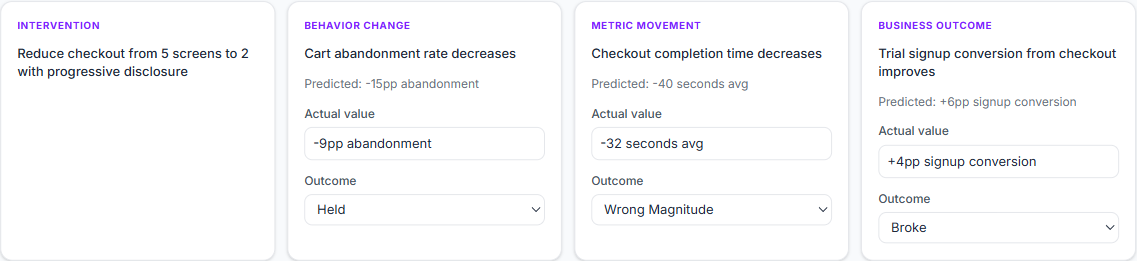
Why one mark per claim, not one per hypothesis? Because most bets are partly right and partly wrong. Marking each claim separately is what lets the Accuracy by claim chart on your dashboard tell you where your thinking actually breaks.
4. Submit
Once every claim has an actual value and an outcome, click Resolve hypothesis →. The hypothesis becomes Resolved, locks for editing, and is added to your calibration data and the Learning Library (unless it's private).

Previous: Visibility and review date ← Next: Resolution notes and lessons →